
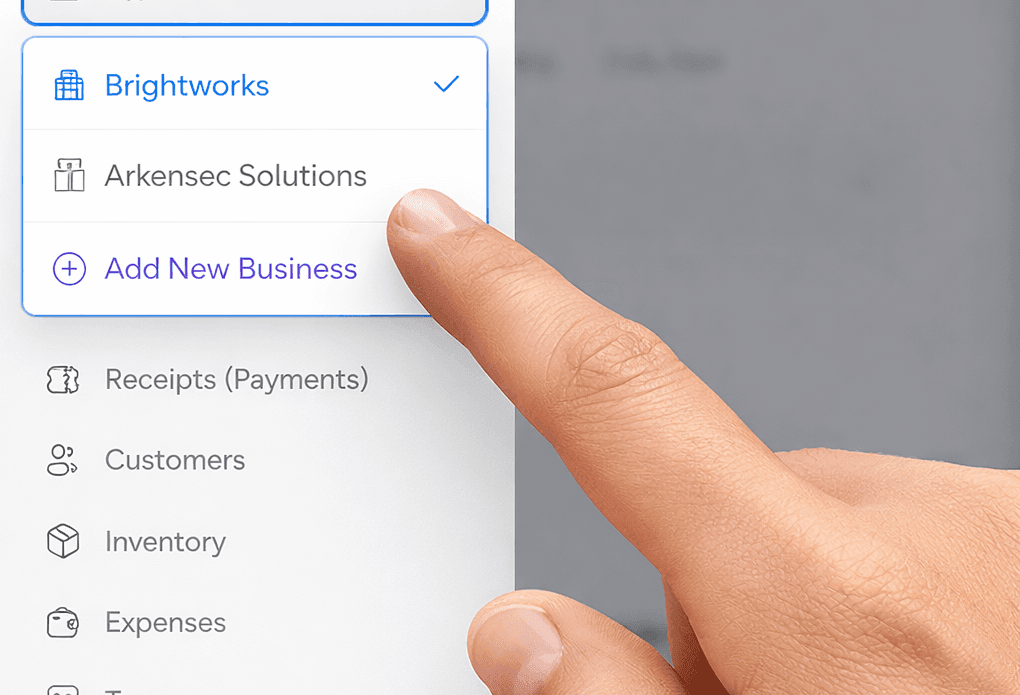
If you run more than one business, you already know the drill.
You've got a consulting gig on the side. A small e-commerce store. Maybe a rental property. Each one has its own customers, its own invoices, its own tax headaches. And until now, you probably had to juggle separate accounts, or worse, mix everything into one messy pile and spend Saturday mornings untangling which invoice belongs to which venture. If you've ever felt the pain of generic invoicing eroding your brand, you know exactly what we mean.
We heard you. And today, every ColorInvoice account can manage multiple businesses from a single login.
One-Click Business Switching and Individual Branding
Here's what multi-business management unlocks for your workflow:
But this post isn't really about the feature itself. It's about what it took to get here, and why we did it anyway.
The Problem Sounds Simple. It Wasn't.
On the surface, "let users add more businesses" sounds like a weekend project. Add a dropdown. Filter some data. Ship it.
In reality, ColorInvoice had been built from day one around the idea that one account equals one business. Every invoice, every customer record, every setting was tied directly to the person who created it. There was no concept of "which business does this belong to?"
How do we restructure the foundation of every piece of data in the system for thousands of existing users without anyone noticing?
So the real question wasn't "How do we add a dropdown?" It was:
How do we restructure the foundation of every piece of data in the system for thousands of existing users without anyone noticing?
The Migration Nobody Saw
This was the part that kept us up at night.
We had two options:
| Approach | Risk Level | User Impact | Our Choice |
|---|---|---|---|
| Maintenance Window | High | Downtime Required | ❌ |
| Invisible Migration | Low | Zero Disruption | ✅ |
We chose option two.
Login Detection
System checks if user has business setup on login.
Automatic Business Creation
Creates default business named after user's company.
Batch Data Tagging
Tags all existing invoices, customers, and receipts with business identifier.
Seamless Completion
Marks migration complete, never runs twice.
Here's how it works. When you log in, the system checks: "Does this account have a business set up yet?" If not, it creates one automatically, named after your company, and silently walks through every invoice, every customer, every receipt you've ever created, tagging each one with your new business identifier. It does this in small, careful batches. It marks itself as done so it never runs twice. And it handles every edge case we could think of: multiple browser tabs open, spotty internet connections, accounts with thousands of records. This same philosophy powers features like our automated recurring invoices, quiet reliability that saves you hours.
You'd never know it happened. That was the point.
The result: zero downtime, zero data loss, zero disruption. Every user's existing data simply appeared under their default business, exactly where they'd expect it.
The Small Details That Matter
Building the multi-business feature right meant sweating details most people will never consciously notice:
"But Why Bother? Your Plans Are So Affordable."
This is the question we get internally too, honestly.
ColorInvoice subscriptions are intentionally priced for freelancers and small business owners: the people who can least afford bloated enterprise software. If you've ever compared us to the alternatives, our head-to-head with Zoho Invoice makes the value gap crystal clear. A feature like multi-business management took weeks. Careful database design. Edge case testing across every single module: invoices, estimates, receipts, recurring schedules, expenses, taxes, the works. Race condition handling. Backwards compatibility. Migration scripting.
That's a lot of engineering hours for a platform that charges less than a coffee subscription.
So why do it?
"The people we build for don't have the luxury of 'just use a different tool for each business.'"
Because the people we build for don't have the luxury of "just use a different tool for each business." They're the freelancer who started a second income stream. The consultant who incorporated . The small agency that just landed a client who needs invoices from a different entity. Some of them are already delegating invoicing to their team, and multi-business makes that even smoother.
They don't need enterprise software with enterprise pricing. They need their tool to grow with them.
That's the bet we're making: that if we build something people genuinely love using, the rest takes care of itself. It's not a sophisticated business strategy. It's just the one we believe in.
What Didn't Make the Cut (Yet)
Transparency matters, so here's what we considered but held back:
Cross-business reporting
A unified dashboard that shows revenue across all your businesses in one view. It's designed, but we want to get the core right first.
Business-specific team permissions
Right now, team members see data for the active business. Granular per-business access controls are on the roadmap.
Bulk business creation
If you're managing 10+ entities, a CSV import for business setup would make sense. We're watching usage patterns before building this.
We'd rather ship something solid and expand it than ship everything half-baked.
Try It Now
If you're already on ColorInvoice, the multi-business feature is live: no update needed, no settings to toggle. Look for the business switcher in your sidebar and create your second business in about four seconds. And if you haven't tried it yet, AI voice invoicing lets you create invoices hands-free while switching between businesses. You can also send invoices straight from ColorInvoice without any SMTP setup, each business using its own branding automatically.
If you're new here, start your free trial. One account is all you need, no matter how many ventures you're juggling.
Zero-downtime migrations are possible with careful planning and invisible background processing. Multi-business management doesn't require multiple subscriptions or complex enterprise solutions. Features that serve growing businesses justify the investment, even at affordable price points.
We build ColorInvoice for people who are too busy running their business to think about invoicing software. If that's you, we're glad you're here.
Ready to upgrade your billing experience?
Stop sending generic PDFs and maintain your brand identity down to the final receipt.
Start your 5-day free trial